Setting Up TikTok Ads
Connect your TikTok Ads account to NettoProfit for full conversion tracking. Step-by-step guide with visuals.
Before you start
You need both the TikTok Developer Platform and TikTok Ads Manager. Note that Access Tokens expire and must be refreshed periodically.
Fields required by NettoProfit
Four fields required — note that the Access Token expires after 24 hours.
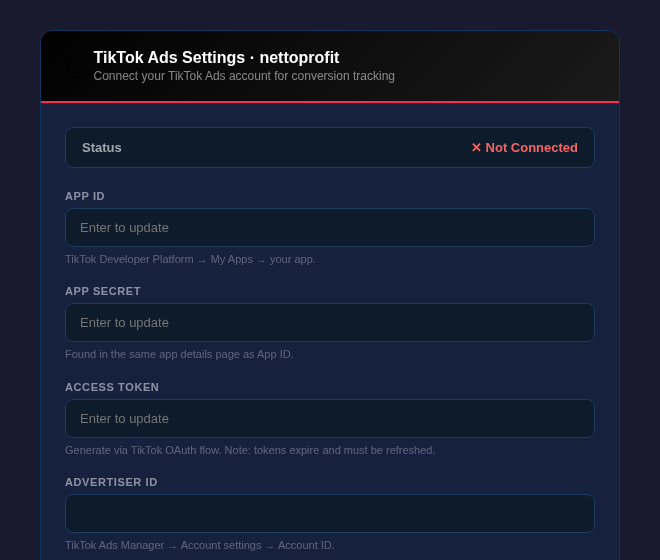
| Field | Location | Status |
|---|---|---|
| App ID | developers.tiktok.com → My Apps → App Details | Required |
| App Secret | developers.tiktok.com → My Apps → App Details (same page) | Required |
| Access Token | TikTok OAuth flow → authorize → copy token | Expires in 24h |
| Advertiser ID | TikTok Ads Manager → Account settings → Account ID | Required |
Your App ID and App Secret are both on the same App Details page. Create a new app if you don't have one yet.

Go to developers.tiktok.com and log in
Click My Apps in the top navigation
Select your app and go to the App Details tab
Copy the App ID (long numeric string starting with 7...)
The App Secret is hidden by default on the same page. Click Show & Copy to reveal it.

Find the App Secret row — it shows dots by default
Click Show & Copy and confirm identity if prompted
Paste it into the App Secret field in NettoProfit
Keep this secret. Never share your App Secret publicly or expose it in client-side code.
The Access Token is generated through TikTok's OAuth flow. NettoProfit will prompt you to authorize access.

In NettoProfit settings, click Authorize with TikTok
A TikTok authorization page opens — log in if needed
Review permissions and click Allow Access
You are redirected back and an Access Token is generated
After authorization, your Access Token is displayed. Copy it immediately — it expires after 24 hours and must be refreshed.

Copy the full Access Token string (starts with act.)
Paste it into the Access Token field in NettoProfit
TikTok tokens expire after 24 hours. Unlike Meta or Google, you must refresh this token periodically. See the API Setup Guide in NettoProfit for how to automate refreshing.
Your Advertiser ID is the numeric ID of your TikTok Ads account, visible in the top right of Ads Manager.

Go to ads.tiktok.com and log in
Your Advertiser ID is shown next to your account name in the top right
Or go to Account → Account Settings to find it clearly
Copy the numeric ID and paste it into Advertiser ID in NettoProfit
Paste all four values and click Save Settings. Status will change to Connected.

Paste App ID
Paste App Secret
Paste Access Token (starts with act.)
Paste Advertiser ID
Click Save Settings
Remember to refresh your Access Token every 24 hours. Check the API Setup Guide in NettoProfit for refresh instructions.
TikTok Ads connected!
Your TikTok Ads account is now active in NettoProfit. Conversion events from your store will flow into your profit dashboard.
Open Dashboard →